មេរៀនទី១៧ ៖ AI ជួយ Debug EA Code
មេរៀននេះត្រូវការ ដោះសោមុនសិន។ ចុចប៊ូតុងខាងក្រោមដើម្បីបន្តទៅមើល Ads ១៥វិនាទី ហើយបន្ទាប់មកអ្នកអាចមើលមេរៀននេះបានរយៈពេល 1 ថ្ងៃ។
- ដោះសោបានមើលបន្តរយៈពេល 24 ម៉ោង
- ពេលចុចដោះសោរសូមមើល Ads អោយបាន ១៥វិនាទី
- អស់ 1 ថ្ងៃ នឹង lock វិញដោយស្វ័យប្រវត្តិ
✅ មេរៀននេះត្រូវបានដោះសោរួចហើយ។ អ្នកអាចមើលបានបន្តរយៈពេល 1 ថ្ងៃ មុនពេលវា lock វិញ។
Lock វិញក្រោយ:
--
AI ជួយ Debug EA Code
 by Sot Dimong
29, June 2026
មេរៀននេះបង្ហាញពីរបៀបប្រើ AI ឬ ChatGPT ដើម្បីជួយរក និងជួសជុលបញ្ហា EA Code
នៅក្នុង MT5/MQL5 ដូចជា compile errors, runtime errors, invalid stops, lot size មិនត្រឹមត្រូវ,
position ជាន់គ្នា និងបញ្ហា Strategy Tester ដោយមាន workflow ច្បាស់លាស់។

សេចក្តីផ្តើម
ការបង្កើត EA មិនបញ្ចប់ត្រឹម code compile បានទេ។ EA អាចមាន bug ក្នុង logic, risk calculation, trade execution, symbol filter, MagicNumber ឬការគ្រប់គ្រង position។ AI អាចជួយអ្នក debug បានលឿន ប៉ុន្តែអ្នកត្រូវផ្តល់ error message, line number, code ផ្នែកពាក់ព័ន្ធ និងអ្វីដែល EA គួរធ្វើឱ្យបានច្បាស់។
ការបង្កើត EA មិនបញ្ចប់ត្រឹម code compile បានទេ។ EA អាចមាន bug ក្នុង logic, risk calculation, trade execution, symbol filter, MagicNumber ឬការគ្រប់គ្រង position។ AI អាចជួយអ្នក debug បានលឿន ប៉ុន្តែអ្នកត្រូវផ្តល់ error message, line number, code ផ្នែកពាក់ព័ន្ធ និងអ្វីដែល EA គួរធ្វើឱ្យបានច្បាស់។
គោលបំណងមេរៀននេះ:
បន្ទាប់ពីរៀនចប់ អ្នកគួរតែអាចរៀបចំ bug report, សរសេរ debug prompt, ផ្ញើ error ទៅ AI ឱ្យបានត្រឹមត្រូវ, បំបែកបញ្ហា compile/runtime/logic, និងបង្កើត checklist សម្រាប់ test EA មុនយកទៅ demo ឬ live account។
បន្ទាប់ពីរៀនចប់ អ្នកគួរតែអាចរៀបចំ bug report, សរសេរ debug prompt, ផ្ញើ error ទៅ AI ឱ្យបានត្រឹមត្រូវ, បំបែកបញ្ហា compile/runtime/logic, និងបង្កើត checklist សម្រាប់ test EA មុនយកទៅ demo ឬ live account។
១. Debug EA Code គឺជាអ្វី?
Debug EA Code គឺជាការរកមូលហេតុថា ហេតុអ្វី code មិន compile, ហេតុអ្វី EA មិនបើក trade, បើក trade ខុស, បិទ trade ខុស ឬគណនា lot ខុស។ វាមិនមែនគ្រាន់តែជួសជុល error ពណ៌ក្រហមក្នុង MetaEditor ប៉ុណ្ណោះទេ។
Debug ល្អត្រូវចាប់ផ្តើមពីការបំបែកបញ្ហា៖ បញ្ហា code syntax, បញ្ហា MQL5 function, បញ្ហា broker rules, បញ្ហា strategy logic ឬបញ្ហា settings ក្នុង Strategy Tester។
Lesson Note: កុំសុំ AI ថា “ជួសជុល code នេះ” ដោយគ្មាន error list។
Prompt ល្អត្រូវមាន error message, line number, code ពាក់ព័ន្ធ និង behavior ដែលអ្នករំពឹងទុក។
២. ប្រភេទ Bug ដែល EA ជួបញឹកញាប់
EA ក្នុង MT5 អាចមាន bug ច្រើនប្រភេទ។ ការដឹងប្រភេទ bug ជួយឱ្យអ្នកសួរ AI បានច្បាស់ជាងមុន។
- Compile Error: undeclared identifier, wrong parameters, missing semicolon
- Runtime Error: array out of range, zero divide, invalid handle
- Trade Error: invalid stops, invalid volume, market closed, not enough money
- Logic Error: signal ខុស, entry លើស, close មិនត្រឹមត្រូវ
- Position Error: position ជាន់គ្នា, MagicNumber filter ខុស, symbol filter ខុស
- Backtest Error: no trades, spread ខ្ពស់, data មិនគ្រប់គ្រាន់, settings មិនត្រឹមត្រូវ
៣. របៀបរៀបចំ Bug Report មុនផ្ញើទៅ AI
មុនសួរ AI អ្នកគួររៀបចំ bug report ឱ្យមាន 5 ចំណុច៖ អ្វីដែលចង់ឱ្យ EA ធ្វើ, អ្វីដែលកើតឡើងពិតប្រាកដ, error message, code ពាក់ព័ន្ធ និង settings ដែលប្រើ។
បើអ្នកផ្ញើ code ទាំងមូលដោយគ្មាន context AI អាចកែខុស logic ឬលុប feature សំខាន់។ ដូច្នេះត្រូវប្រាប់ថា “កុំប្តូរ trading logic លុះត្រាតែចាំបាច់”។
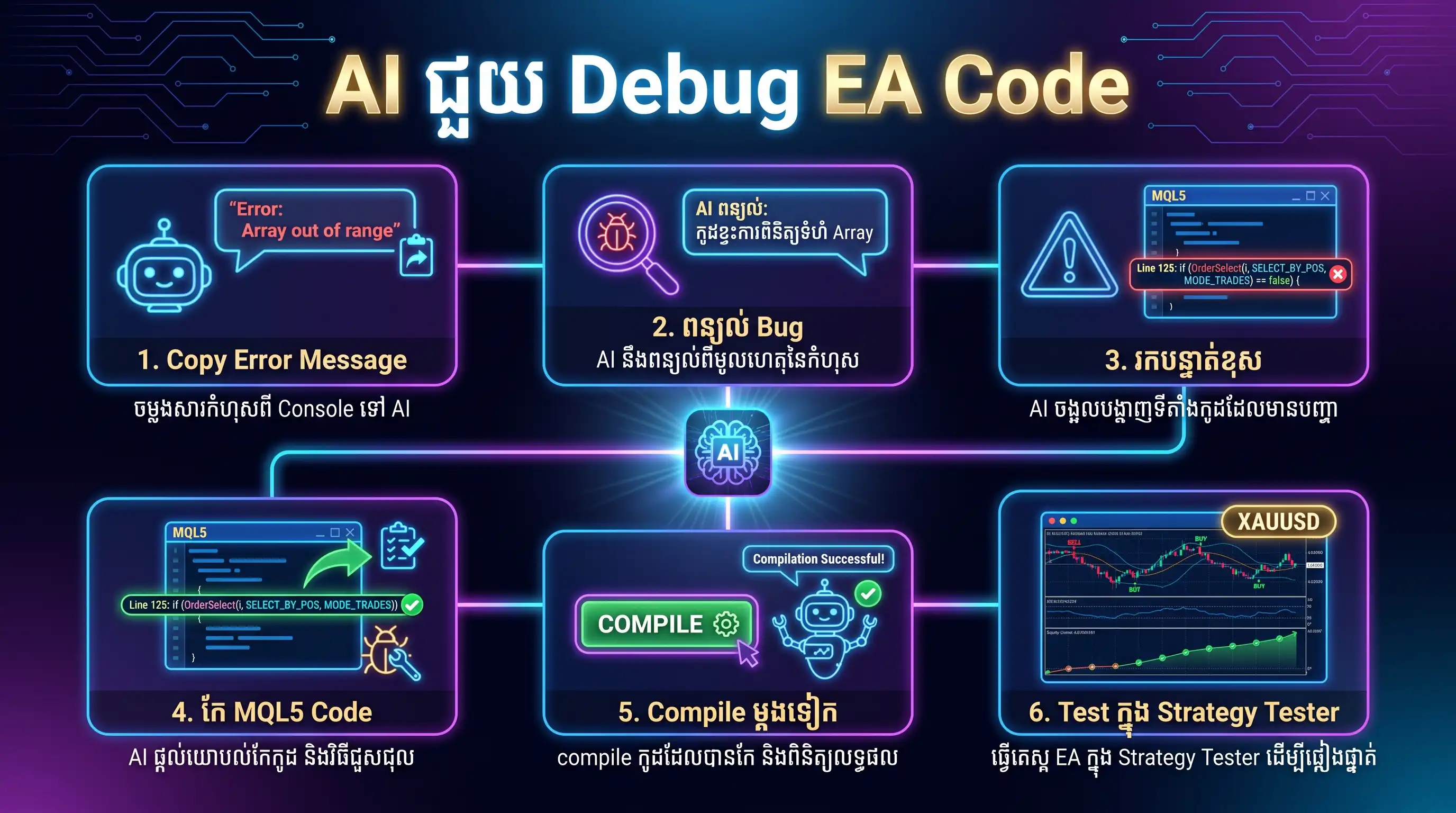
៤. Prompt សម្រាប់ Compile Error
Compile error ជាបញ្ហាដែល MetaEditor បង្ហាញមុន code អាចដំណើរការ។ សូម copy error list ពេញលេញ រួមទាំង line និង column ផ្ញើទៅ AI។
📌 Compile Error Debug Prompt
EN: Fix these MQL5 compile errors. I will paste the error list, line numbers, and the related code section. Explain the cause briefly, then provide the corrected code. Do not change the trading logic unless it is required to compile. KH: ជួសជុល MQL5 compile errors ទាំងនេះ។ ខ្ញុំនឹងផ្ញើ error list, line numbers និង code section ពាក់ព័ន្ធ។ សូមពន្យល់មូលហេតុខ្លីៗ បន្ទាប់មកផ្តល់ code ដែលបានកែ។ កុំប្តូរ trading logic លុះត្រាតែចាំបាច់ដើម្បីឱ្យ compile បាន។
៥. Prompt សម្រាប់ Runtime Error និង Journal Log
Runtime error កើតឡើងពេល EA កំពុងដំណើរការ។ ឧទាហរណ៍ array out of range, invalid indicator handle, division by zero ឬ order send failed។ អ្នកគួរយក log ពី Experts tab និង Journal tab មកឱ្យ AI ពិនិត្យ។
📌 Runtime Log Debug Prompt
EN: Analyze this MT5 EA runtime error using the Experts and Journal logs. Find the likely cause, explain which function or condition is failing, and provide a safe fix with extra logging so I can test it again. KH: វិភាគ runtime error នេះរបស់ MT5 EA ដោយប្រើ Experts និង Journal logs។ រកមូលហេតុដែលអាចកើតឡើង, ពន្យល់ថា function ឬ condition មួយណាបរាជ័យ ហើយផ្តល់ safe fix រួមជាមួយ logging បន្ថែម ដើម្បីឱ្យខ្ញុំ test ម្តងទៀត។
៦. Prompt សម្រាប់ Invalid Stops / Lot Size
បញ្ហា invalid stops និង invalid volume ជួបញឹកញាប់ក្នុង EA ព្រោះ broker មាន rule ផ្សេងៗ ដូចជា minimum stop distance, lot step, min lot, max lot និង digits ខុសគ្នា។
📌 Broker Rule Debug Prompt
EN: Fix the invalid stops or invalid volume problem in this MQL5 EA. Add normalization for price and lot size, check SYMBOL_TRADE_STOPS_LEVEL, SYMBOL_VOLUME_MIN, SYMBOL_VOLUME_MAX, SYMBOL_VOLUME_STEP, and print clear debug messages before sending orders. KH: ជួសជុលបញ្ហា invalid stops ឬ invalid volume ក្នុង MQL5 EA នេះ។ បន្ថែម normalization សម្រាប់ price និង lot size, ពិនិត្យ SYMBOL_TRADE_STOPS_LEVEL, SYMBOL_VOLUME_MIN, SYMBOL_VOLUME_MAX, SYMBOL_VOLUME_STEP និង print debug messages ឱ្យច្បាស់ មុនបញ្ជូន order។
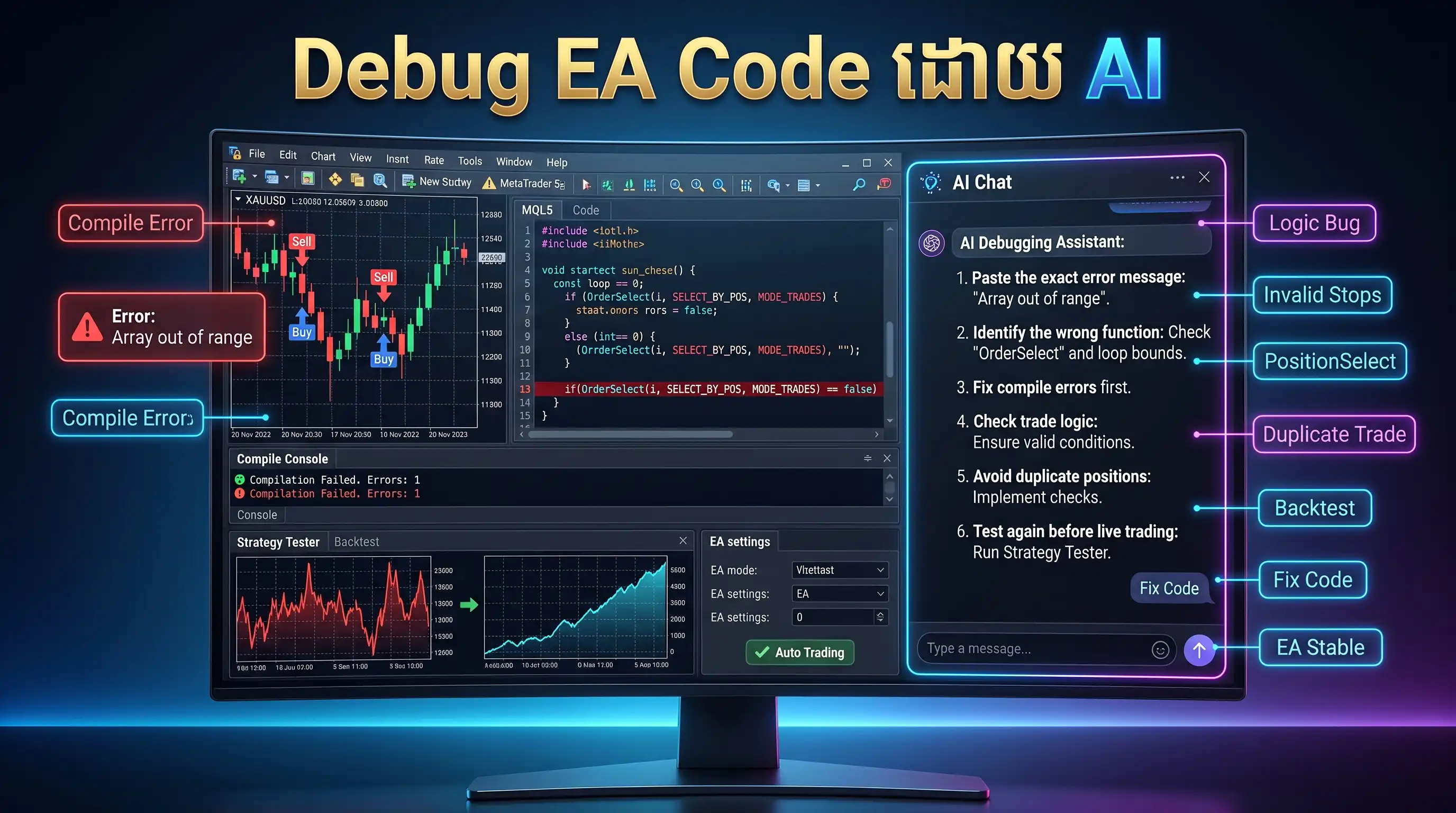
៧. Debug Logic Error: EA មិនបើក Trade ឬបើកខុស
ពេល EA compile បាន ប៉ុន្តែមិនបើក trade អាចមកពី condition តឹងពេក, new bar filter, spread filter, session filter, indicator value មិនទាន់ ready ឬ symbol/timeframe ខុស។ ត្រូវឱ្យ AI បន្ថែម Print log ដើម្បីដឹងថា condition មួយណាមិន pass។
📌 Logic Debug Prompt
EN: This EA compiles but does not open trades as expected. Add step-by-step debug Print messages for every entry condition, spread filter, session filter, indicator value, and trade permission check. Do not change the strategy yet; first help me identify which condition is blocking trades. KH: EA នេះ compile បាន ប៉ុន្តែមិនបើក trade តាមដែលរំពឹងទុក។ សូមបន្ថែម debug Print messages ជាជំហានៗ សម្រាប់ entry condition នីមួយៗ, spread filter, session filter, indicator value និង trade permission check។ កុំទាន់ប្តូរ strategy; សូមជួយរកថា condition មួយណាកំពុង block trade។
៨. Debug Position ជាន់គ្នា និង MagicNumber
EA មួយចំនួនបើក position ជាន់គ្នា ព្រោះមិនបាន filter symbol, MagicNumber ឬ position type។ ក្នុង MT5 គណនី netting និង hedging ក៏មាន behavior ខុសគ្នា ដូច្នេះត្រូវឱ្យ AI បញ្ជាក់ logic ឱ្យត្រឹមត្រូវ។
📌 Duplicate Position Debug Prompt
EN: Fix the duplicate position problem in this MT5 EA. Add a reliable function that checks existing positions by symbol, MagicNumber, and position type. Support both hedging and netting account behavior where possible, and explain the logic clearly. KH: ជួសជុលបញ្ហា position ជាន់គ្នា ក្នុង MT5 EA នេះ។ បន្ថែម function ដែលពិនិត្យ positions ដែលមានស្រាប់តាម symbol, MagicNumber និង position type ឱ្យបានត្រឹមត្រូវ។ សូមគាំទ្រ hedging និង netting account behavior តាមដែលអាចធ្វើបាន ហើយពន្យល់ logic ឱ្យច្បាស់។
៩. Checklist មុននិយាយថា EA គ្មាន Bug
- Compile 0 errors និង 0 warnings ឬដឹងច្បាស់ថា warning មិនគ្រោះថ្នាក់
- Experts និង Journal tab មិនបង្ហាញ error ដដែលៗ
- EA មិនបើក position ជាន់គ្នាខុស logic
- Lot size ត្រូវតាម min/max/step របស់ broker
- SL/TP ត្រូវគោរព stop level និង digits របស់ symbol
- MagicNumber និង symbol filter ដំណើរការត្រឹមត្រូវ
- Backtest មាន trade behavior សមហេតុផល មិនមែន profit ដោយ bug
សង្ខេបមេរៀនទី១៧:
- Debug EA Code ត្រូវចាប់ផ្តើមពី bug report ច្បាស់
- AI ជួយបានល្អបំផុតពេលមាន error message, line number និង code ពាក់ព័ន្ធ
- Bug មាន compile, runtime, trade execution, logic និង backtest issue
- Invalid stops/volume ត្រូវពិនិត្យ broker rules និង normalize values
- Logic bug ត្រូវប្រើ Print log ដើម្បីរក condition ដែល block trade
- មុន live ត្រូវ test ក្នុង Strategy Tester និង demo account ជាមុនសិន
១០. សម្រាប់អ្នកចាប់ផ្តើម
បើអ្នកទើបចាប់ផ្តើម debug EA សូមកុំផ្ញើ code ទាំងមូលទៅ AI ម្តងភ្លាមៗ។ ចាប់ផ្តើមពី error មួយ ឬ function មួយសិន។ Copy error message ពេញលេញ និង code ជុំវិញ line ដែលមានបញ្ហា 20–40 ជួរ។
ពេល AI កែ code សូមប្រៀបធៀបថា វាប្តូរ logic ឬអត់។ កុំទុកចិត្ត code ថ្មីភ្លាមៗ។ Compile, backtest, ពិនិត្យ log និង run demo test មុនប្រើលុយពិតជានិច្ច។
សូមត្រៀមខ្លួនសម្រាប់មេរៀនបន្ទាប់៖ “មេរៀនទី១៨៖ AI សម្រាប់ Backtest Analysis”។


សូមរង់ចាំ និងមើល ads
សូមរង់ចាំ 15 វិនាទី ដើម្បីបន្តមើលមេរៀននេះ។ Ads កំពុងបើកសម្រាប់អ្នក។
15
បន្ទាប់ពី countdown ចប់ អ្នកអាចមើលមេរៀននេះបានរយៈពេល 1 ថ្ងៃ